
DNS Configuration Issues
Normally, a computer obtains its DNS address automatically, but under certain conditions users need to set the DNS address manually. For example, businesses, companies, and schools all have their own local area networks, and users may browse very slowly or be unable to open web pages, with messages such as “DNS resolution error”. As for how to configure DNS, this question is indeed very simple for computer IT staff, but for novice users it is a mystery. So how can
GPON Network Fault Handling Process
To support the daily work of network professionals, the following GPON network troubleshooting procedure has been compiled for study and reference. Start—Preliminary fault location—Check fiber status—Check ONU status—Check equipment operating status—Check equipment data configuration—Check upstream equipment status—End. Common Issues Issue 1 (Unable to access the Internet): Possible causes: User terminal failure Data configuration issues Upstream equipment issues Network attacks. Preliminary assessment of fault location and cause: User terminal or external line failure, e.g. PON port failure. Optical path issues. Data
Which Wires in an 8-Core Twisted-Pair Ethernet Cable Are Actually Used?
When connecting network cables, many people find it hard to tell which of the eight copper conductors inside the cable are the ones that keep network transmission working properly. First, you need to understand the overall role of the eight copper conductors. They exist to reduce mutual electromagnetic interference, with every two conductors twisted together at a set density. This way, the radio waves radiated by each conductor during electrical signal transmission cancel each other out, effectively eliminating interference. The
5 Best Network Troubleshooting Software Tools
By using convenient network troubleshooting apps, you will be able to analyze exactly what is happening, how fast the network is, and more. Below, let us look at the 5 best network troubleshooting apps. IP Tools: Network Utilities Whatever the problem with your network, IP Tools: Network Utilities can help you pinpoint it. The app provides all the information you need to know. And even when you are away from home, you can optimize your home network and restore it
Three Major 5G Application Scenarios Empower IoT Industry Expansion
The Internet of Things is becoming a new-generation business infrastructure across industries and countries, and is expected to become the largest investment opportunity in the ICT sector over the next 30 years. At the network layer of IoT, the commercialization of 5G and the momentum behind WiFi 6 are driving continuous upgrades to communications networks, which in turn is accelerating IoT adoption in a number of sectors. According to analysis, 5G empowers the expansion of the IoT industry through the
NSA and SA in 5G Networks
“Network architecture” refers to how base stations and the core network are combined. Unlike 4G, 5G supports two network architectures: NSA (Non-Standalone) and SA (Standalone). SA involves building an entirely new network, including new base stations, backhaul links, and a core network. It uses 5G base stations on the radio access side and a 5G core network. NSA, by contrast, uses existing 4G infrastructure to deploy 5G. In this architecture, 4G and 5G base stations coexist on the radio access
What Is 5G Network Slicing?
5G network slicing is a technology defined by 3GPP. Its purpose is to carve out dedicated virtual networks on an operator’s 5G network for different industries or enterprises, so as to meet their individual networking requirements. Put simply, it divides one physical 5G network into N logical networks according to the needs of different application scenarios, each serving a different scenario. In other words, because industries and enterprises have diverse network requirements, 5G networks need to be sliced to optimize
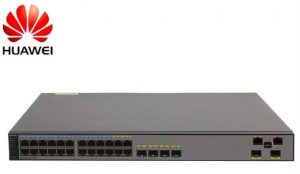
How to Reset the Password on a Huawei AC Device
If you forget the Console port login password, you can set a new Console port login password in either of the following two ways: Resetting the password when Telnet login is available: Log in to the switch through STelnet/Telnet to set a new Console port login password This method requires that you have an STelnet/Telnet account with administrator rights. The command lines and command output below use the case of logging in to the device through STelnet to change
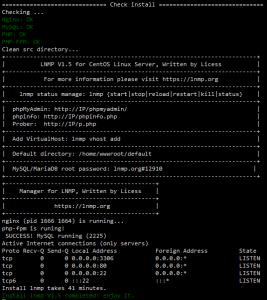
LNMP One-Click Installer
Installation Requirements: CentOS/RHEL/Fedora/Debian/Ubuntu/Raspbian/Deepin/Aliyun/Amazon/Mint Linux distributions At least 5GB of free disk space; at least 9GB free for MySQL 5.7 or MariaDB 10 At least 128MB of RAM (for 128MB low-memory VPS: Xen requires SWAP; OpenVZ requires at least 128MB of vSWAP or burstable memory). Note: do not use a 64-bit system on low-memory machines! Installing MySQL 5.6 or 5.7, or MariaDB 10 requires at least 1GB of RAM; higher versions require at least 2GB of RAM!. Installing PHP 7 or
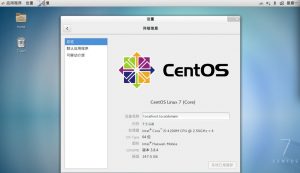
Disable the Firewall and SELinux on CentOS7
Firewall (firewalld) Temporarily stop the firewall systemctl stop firewalld Disable the firewall at startup systemctl disable firewalld Temporarily start the firewall systemctl start firewalld Enable the firewall at startup systemctl enable?firewalld Check the firewall status systemctl status firewalld END SELinux 1 Temporarily disable SELinux enforcement setenforce 0 2 Temporarily enable SELinux enforcement setenforce 1 3 Disable SELinux at startup Edit the /etc/selinux/config file and set SELINUX to disabled, as shown below. SELinux will be disabled on the next boot. 4